Blog Details
Steam API Key: What It Is & When You Need One
Some trading platforms may request your Steam API key. Here’s everything you need to know to keep your information secure.
What is a Steam API Key?
A Steam Web API key allows third-party applications to:
- Access your publicly available Steam profile information
- View the items in your inventory
- Send and withdraw trade offers on your behalf
Essentially, it grants an app the authority to operate within Steam on your behalf.
When is an API Key Required?
Valid Uses
- Automated trading bots – For immediate trades
- Price checking applications – To analyze inventory
- Trading websites – To facilitate exchanges
- Development/Testing – If you’re creating your own tools
When It’s Not Necessary
- Standard marketplace transactions
- Direct trades on Steam
- Manually checking inventories
- Most general trading websites
How to Acquire an API Key
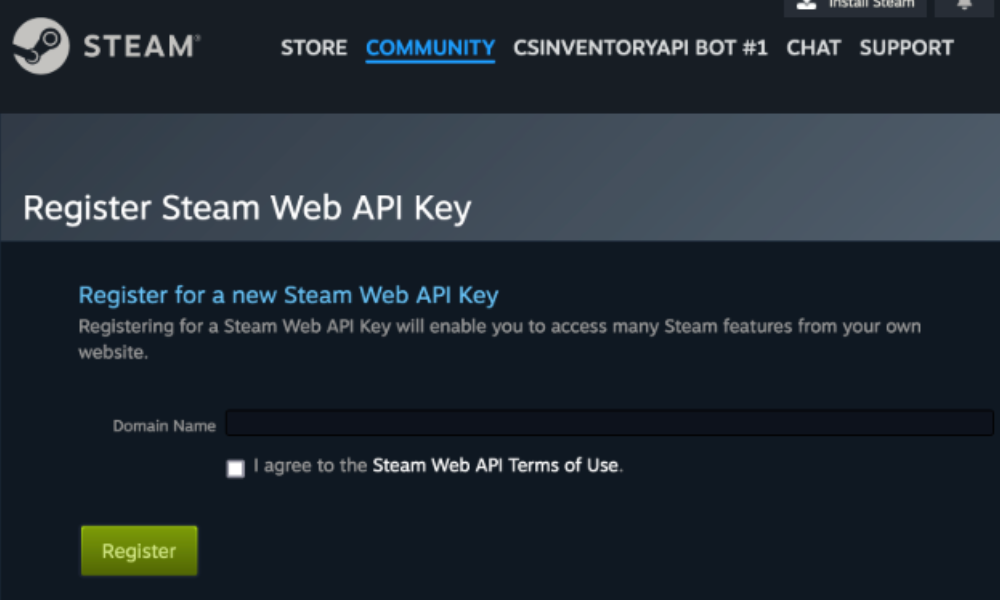
- Visit steamcommunity.com/dev/apikey
- Log into your Steam account
- Input a domain name (any name is acceptable for personal use)
- Click Register
- Your API key will be shown
Note: You receive ONE key only. Registering again will overwrite the previous one.
Security Concerns
Potential Misuse of Your API Key
- 🚨 Access all pending trade offers
- 🚨 Cancel your valid trades
- 🚨 Send fraudulent trade offers that appear authentic
- 🚨 Observe changes in your inventory
- 🚨 Enable trade scams
Typical Scam Scenario
Here’s how an API key scam usually unfolds:
- The scammer obtains your API key
- You accept a legitimate trade
- The scammer cancels it using the API
- The scammer sends a similar trade with their worthless items
- You accept, believing it’s the original offer
- Your items are sent to the scammer
How to Stay Secure
Verify Your API Key Registration
- Navigate to the Steam API page
- If a key is listed and you did not create it, your account is compromised
- Click Revoke immediately
Steps After Revocation
- Change your Steam password
- Review recent trades for any suspicious activity
- Remove any apps that look suspicious
- Enable Steam Guard if you haven’t done so already
Preventive Measures
- ✅ Never disclose your API key
- ✅ Only provide it to trusted websites that you’ve thoroughly researched
- ✅ Regularly confirm whether your key is registered
- ✅ Be wary of sites requesting your API key
When to Trust a Website with Your API Key
Consider sharing it only if:
- They have a well-established reputation
- They provide clear reasons for needing it
- They have a large user community
- They are transparent about how they use it
Most credible trading platforms do not require your API key for basic transactions.
Alternative: Using Trade Links Only
Many websites only need your Trade URL instead of your API key. This approach is safer:
- Trade URL = They can send you offers
- API Key = They can alter offers
Whenever possible, opt for sites that only request your Trade URL.